> ## Documentation Index
> Fetch the complete documentation index at: https://docs.sezzle.com/llms.txt
> Use this file to discover all available pages before exploring further.
# Introduction
## Direct Integration Order Flow
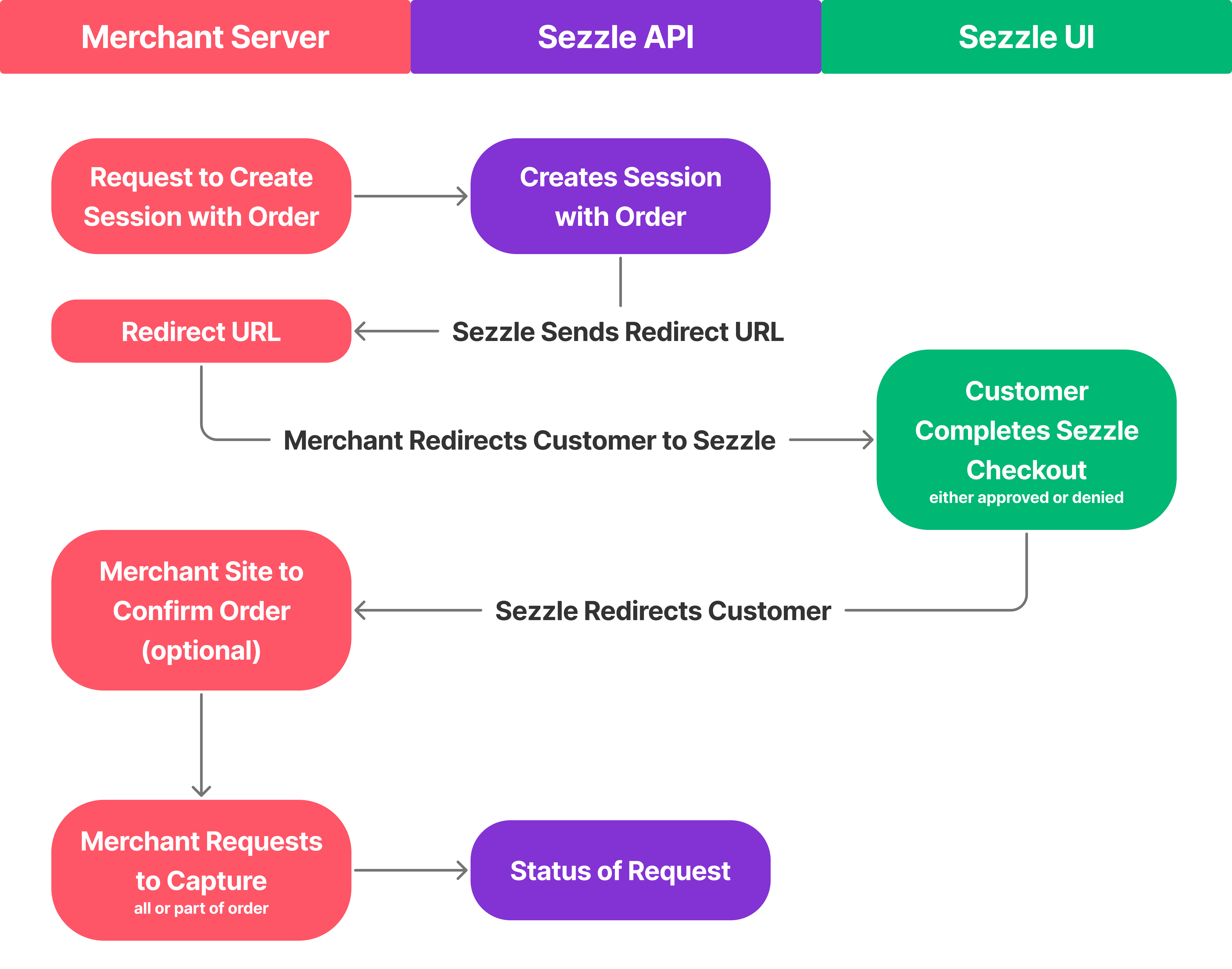 1. Request Payment Session Creation
* The Merchant Server sends a request to the Sezzle API to create a payment session for the customer’s order, including details like the order amount, items, and customer information.
2. Generate Session and Redirect URL
* The Sezzle API processes the request, creates a session linked to the order, and generates a redirect URL for the customer to access the Sezzle UI for payment processing.
3. Receive Redirect URL from Sezzle API
* The Sezzle API sends the generated redirect URL to the Merchant Server, allowing the merchant to proceed with customer redirection.
4. Redirect Customer to Sezzle UI
* Using the redirect URL, the Merchant Server directs the customer to the Sezzle UI to complete the payment process.
5. Process Customer Checkout in Sezzle UI
* The customer reviews the order in the Sezzle UI and completes the checkout.
* Sezzle assesses the customer’s financing eligibility (e.g., via a credit check), approving or denying the transaction.
* If denied, the customer must use an alternative payment method.
6. Redirect Customer Back to Merchant Site (Optional)
* After checkout (approved or denied), Sezzle redirects the customer to the Merchant Site.
* The merchant may display a confirmation page showing the order status (e.g., “Order Confirmed” or “Payment Failed”).
* This step is optional based on the merchant’s preference.
7. Request Fund Capture
* Upon payment approval, the Merchant Server sends a request to the Sezzle API to capture the order funds, either in full or partially (e.g., for partial shipments).
8. Receive Transaction Status from Sezzle API
* The Sezzle API processes the capture request and returns the transaction status to the Merchant Server.
* The status indicates whether the funds were captured successfully or if issues occurred (e.g., invalid amount and/or currency etc.).
* The merchant updates their system and notifies the customer accordingly.
1. Request Payment Session Creation
* The Merchant Server sends a request to the Sezzle API to create a payment session for the customer’s order, including details like the order amount, items, and customer information.
2. Generate Session and Redirect URL
* The Sezzle API processes the request, creates a session linked to the order, and generates a redirect URL for the customer to access the Sezzle UI for payment processing.
3. Receive Redirect URL from Sezzle API
* The Sezzle API sends the generated redirect URL to the Merchant Server, allowing the merchant to proceed with customer redirection.
4. Redirect Customer to Sezzle UI
* Using the redirect URL, the Merchant Server directs the customer to the Sezzle UI to complete the payment process.
5. Process Customer Checkout in Sezzle UI
* The customer reviews the order in the Sezzle UI and completes the checkout.
* Sezzle assesses the customer’s financing eligibility (e.g., via a credit check), approving or denying the transaction.
* If denied, the customer must use an alternative payment method.
6. Redirect Customer Back to Merchant Site (Optional)
* After checkout (approved or denied), Sezzle redirects the customer to the Merchant Site.
* The merchant may display a confirmation page showing the order status (e.g., “Order Confirmed” or “Payment Failed”).
* This step is optional based on the merchant’s preference.
7. Request Fund Capture
* Upon payment approval, the Merchant Server sends a request to the Sezzle API to capture the order funds, either in full or partially (e.g., for partial shipments).
8. Receive Transaction Status from Sezzle API
* The Sezzle API processes the capture request and returns the transaction status to the Merchant Server.
* The status indicates whether the funds were captured successfully or if issues occurred (e.g., invalid amount and/or currency etc.).
* The merchant updates their system and notifies the customer accordingly.