> ## Documentation Index
> Fetch the complete documentation index at: https://docs.sezzle.com/llms.txt
> Use this file to discover all available pages before exploring further.
# iOS SDK
This guide walks you through integrating the Sezzle iOS SDK into your app. By the end, your app will display Sezzle promotional messaging on product pages and launch Sezzle checkout.
### Prerequisites
* iOS 15.0+ deployment target
* Swift 5.9+
* A Sezzle merchant account with your Public API Key
* A backend server to capture payments after checkout
A working example app is included in the SDK repo at Example/SezzleCheckoutExample. It demonstrates all widget variants and both checkout modes.
## 1. Installation
1. In Xcode, go to **File > Add Package Dependencies**
2. Enter the repository URL:
```
https://github.com/sezzle/sezzle-merchant-sdk-ios.git
```
3. Select **Up to Next Major Version** from the latest release
4. Add `SezzleMerchantSDK` to your target
Add to your `Podfile`:
```ruby theme={"system"}
pod 'SezzleMerchantSDK'
```
Then run:
```bash theme={"system"}
pod install
```
**Requirements:** iOS 15.0+, Swift 5.9+
## 2. Configuration
Initialize the SDK once at app startup in your `AppDelegate`:
```swift theme={"system"}
import SezzleMerchantSDK
@main
class AppDelegate: UIResponder, UIApplicationDelegate {
func application(
_ application: UIApplication,
didFinishLaunchingWithOptions launchOptions: [UIApplication.LaunchOptionsKey: Any]?
) -> Bool {
SezzleSDK.shared.configure(
publicKey: "sz_pub_your_key_here",
environment: .production // use .sandbox for testing
)
return true
}
}
```
| Parameter | Type | Default | Description |
| ------------- | ------------------- | ------------- | ---------------------------------------------- |
| `publicKey` | `String` | Required | Your Sezzle public API key |
| `environment` | `SezzleEnvironment` | `.production` | `.sandbox` for testing, `.production` for live |
Never include your **private** API key in the app. The SDK only uses the public key. Use your private key server-side to capture payments.
## 3. Promotional Messaging
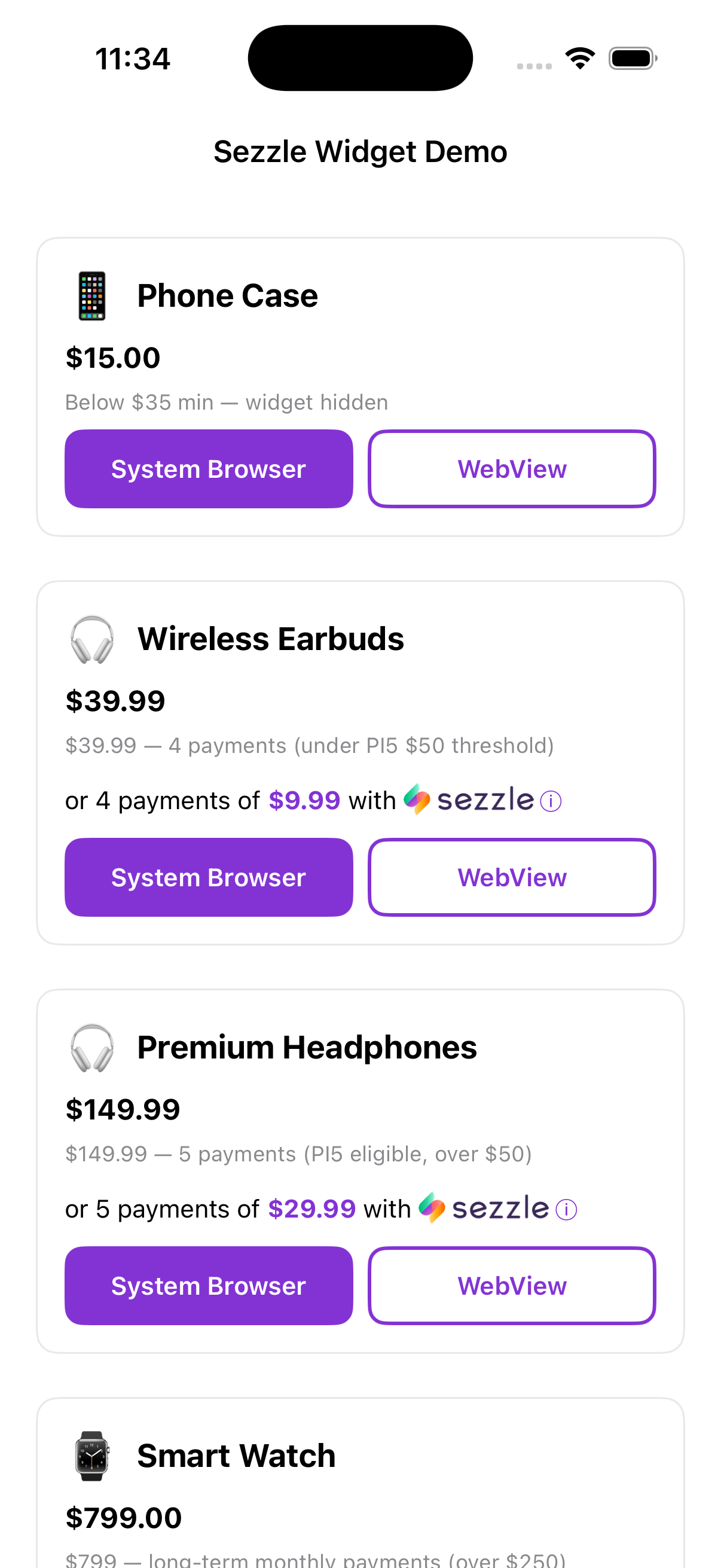
Add a `SezzlePromotionalView` to your product page to display installment pricing:
```swift theme={"system"}
import SezzleMerchantSDK
let promoView = SezzlePromotionalView(
amountInCents: 9999, // $99.99
presentingFrom: self // UIViewController for modal presentation
)
view.addSubview(promoView)
```
The widget automatically shows the correct message based on the price and updates when you call:
```swift theme={"system"}
promoView.update(amountInCents: 14999) // price changed to $149.99
```
 ### All Parameters
```swift theme={"system"}
SezzlePromotionalView(
amountInCents: Int,
currency: String = "USD",
style: SezzlePromotionalStyle = .light,
widgetConfig: SezzleWidgetConfig = .default,
presentingFrom viewController: UIViewController
)
```
| Parameter | Type | Default | Description |
| ---------------- | ------------------------ | ---------- | ------------------------------------------------ |
| `amountInCents` | `Int` | Required | Product price in cents (e.g., 4999 = \$49.99) |
| `currency` | `String` | `"USD"` | ISO 4217 currency code (e.g., `"USD"`, `"CAD"`) |
| `style` | `SezzlePromotionalStyle` | `.light` | `.light` for light backgrounds, `.dark` for dark |
| `widgetConfig` | `SezzleWidgetConfig` | `.default` | Controls pricing thresholds and Pay-in-5 |
| `presentingFrom` | `UIViewController` | Required | View controller to present the info modal from |
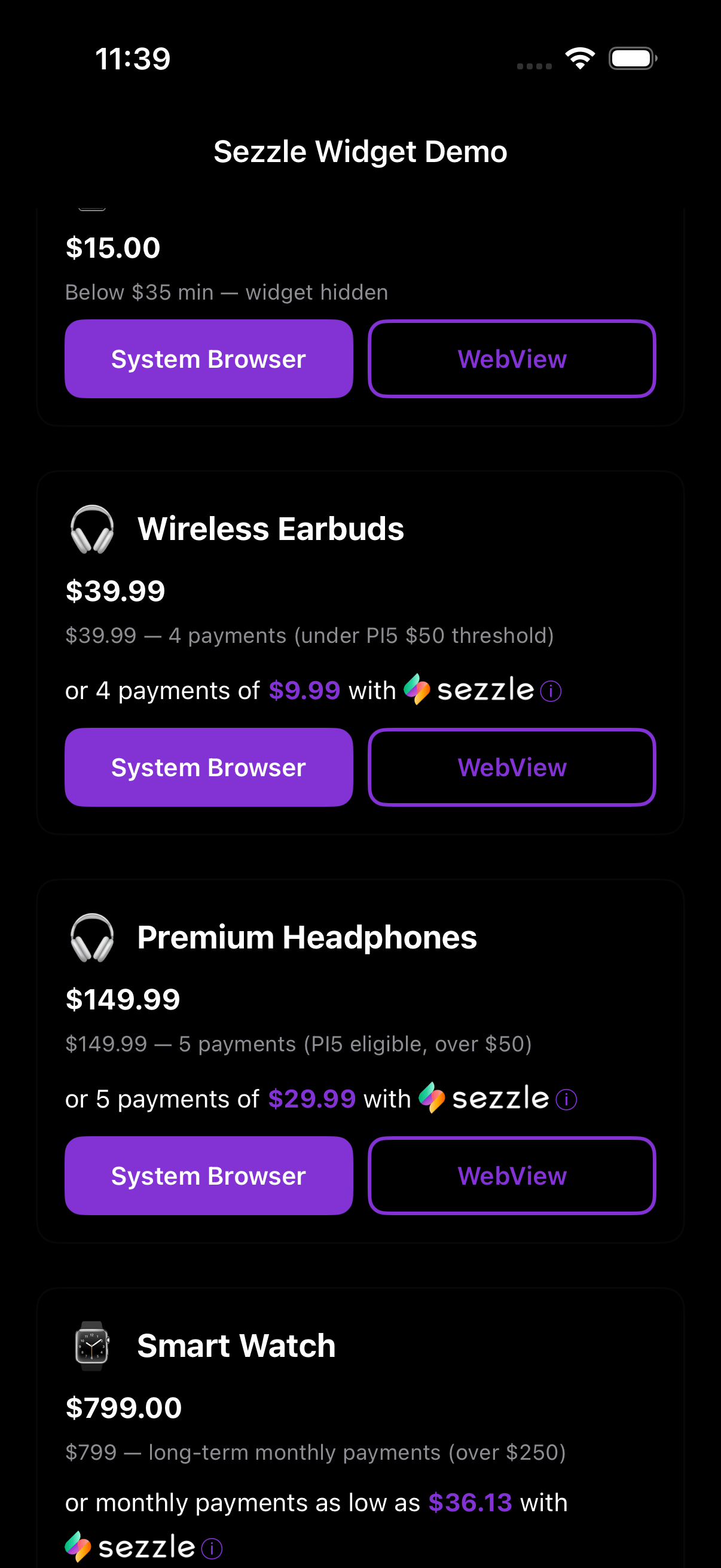
The widget auto-detects dark mode and switches styles via `traitCollectionDidChange`. If you want to force a specific style, pass `.light` or `.dark` explicitly.
### Widget Configuration
All config parameters are **optional** — the widget works out of the box with sensible defaults:
| Parameter | Default | Description |
| -------------------- | ------------------ | ------------------------------------------------------------------------------- |
| `minPriceInCents` | `3500` (\$35) | Minimum price to show the widget |
| `maxPriceInCents` | `250000` (\$2,500) | Maximum price for short-term (PI4/PI5) |
| `enablePayIn5` | `true` | Show "5 payments" for prices at or above the PI5 threshold |
| `pi5MinPriceInCents` | `5000` (\$50) | Price threshold for Pay-in-5 |
| `longTermConfig` | `nil` (disabled) | Enable long-term monthly payments — set to a `SezzleLongTermConfig` to activate |
To customize, pass only the values you want to override:
```swift theme={"system"}
let config = SezzleWidgetConfig(
longTermConfig: SezzleLongTermConfig(
minPriceInCents: 25_000 // $250+ shows monthly payments
)
)
let promoView = SezzlePromotionalView(
amountInCents: 79900,
widgetConfig: config,
presentingFrom: self
)
```
### Custom Promotional Text
If you need full control over the UI, use `SezzlePromoDataHandler` to get a styled `NSAttributedString` with the Sezzle logo inline:
```swift theme={"system"}
SezzlePromoDataHandler.getMessage(amountInCents: 9999) { attributedString in
myLabel.attributedText = attributedString
}
```
## 4. Checkout
### Build the Checkout Object
```swift theme={"system"}
let checkout = SezzleCheckout(
customer: SezzleCustomer(
email: "customer@example.com",
firstName: "Jane",
lastName: "Doe",
phone: "+15551234567",
billingAddress: SezzleAddress(
street: "123 Main St",
city: "Minneapolis",
state: "MN",
postalCode: "55401",
countryCode: "US"
)
),
order: SezzleOrder(
referenceId: "order-12345",
description: "Wireless Earbuds",
amount: SezzleAmount(amountInCents: 4599, currency: "USD"),
items: [
SezzleItem(
name: "Wireless Earbuds",
sku: "WE-001",
quantity: 1,
price: SezzleAmount(amountInCents: 3999, currency: "USD")
)
],
taxAmount: SezzleAmount(amountInCents: 350, currency: "USD"),
shippingAmount: SezzleAmount(amountInCents: 250, currency: "USD")
)
)
```
#### Customer Fields
| Field | Required | Description |
| ----------------- | -------- | ----------------------------------- |
| `email` | Yes | Customer email address |
| `firstName` | No | Customer first name |
| `lastName` | No | Customer last name |
| `phone` | No | Customer phone number |
| `dob` | No | Date of birth (`"YYYY-MM-DD"`) |
| `billingAddress` | No | Billing address (`SezzleAddress`) |
| `shippingAddress` | No | Shipping address (`SezzleAddress`) |
| `tokenize` | No | Tokenize customer for future orders |
#### Order Fields
| Field | Required | Description |
| -------------------------- | -------- | ----------------------------------------------------------------------------------------------------------------------------------------------------------------- |
| `referenceId` | Yes | Your internal order/reference ID |
| `description` | No | Order description |
| `amount` | Yes | Total order amount in cents + currency |
| `intent` | No | [`.auth`](/docs/api/core/sessions/postv2session#body-order-intent) (default, capture later from your backend) or `.capture` (auto-capture at checkout completion) |
| `items` | No | Line item details |
| `discounts` | No | Discount line items (`[SezzleDiscount]`) |
| `taxAmount` | No | Tax amount breakdown |
| `shippingAmount` | No | Shipping amount breakdown |
| `metadata` | No | Custom key-value pairs. The SDK automatically includes `_sdk_platform`, `_sdk_version`, `_device_model`, and `_os_version` — avoid using keys prefixed with `_`. |
| `locale` | No | Checkout locale (`.enUS`, `.enCA`, `.frCA`) |
| `checkoutFinancingOptions` | No | Restrict to specific plans: `.fourPayBiweekly`, `.fourPayMonthly`, `.sixPayMonthly`. Optional — omit to let Sezzle show all eligible plans. |
#### Address Fields (`SezzleAddress`)
| Field | Description |
| ------------- | ------------------------------- |
| `name` | Full name |
| `street` | Street address line 1 |
| `street2` | Street address line 2 |
| `city` | City |
| `state` | State or province |
| `postalCode` | Postal/ZIP code |
| `countryCode` | ISO country code (e.g., `"US"`) |
| `phone` | Phone number |
### Start Checkout
```swift theme={"system"}
SezzleSDK.shared.startCheckout(
checkout,
from: self, // presenting UIViewController
delegate: self, // SezzleCheckoutDelegate
mode: .systemBrowser // or .webView
)
```
### Handle the Result
Conform to `SezzleCheckoutDelegate`:
```swift theme={"system"}
extension ProductViewController: SezzleCheckoutDelegate {
func checkoutDidComplete(result: SezzleCheckoutResult) {
// For this flow, `result.orderUUID` is populated.
// (For the server-driven flow, see Section 8.)
if let orderUUID = result.orderUUID {
// Send orderUUID to your backend to capture payment
// POST /v2/order/{orderUUID}/capture
print("Order completed: \(orderUUID)")
}
}
func checkoutDidCancel() {
// Customer closed checkout without completing
print("Checkout cancelled")
}
func checkoutDidFail(error: SezzleError) {
// Handle the error
switch error {
case .networkError(let underlying):
print("Network error: \(underlying)")
case .apiError(let statusCode, let message):
print("API error \(statusCode): \(message)")
case .browserDismissed:
print("Browser dismissed")
case .notConfigured:
print("SDK not configured")
case .invalidResponse:
print("Invalid response")
}
}
}
```
After `checkoutDidComplete`, send `result.orderUUID` to your backend server. Your server should call `POST /v2/order/{orderUUID}/capture` using your **private** API key to capture the payment. See the [Orders API](/docs/api/core/orders/postv2capturebyorder) for details.
## 5. WebView Mode
By default, checkout opens in `ASWebAuthenticationSession` (system browser). To keep the user inside your app, use WebView mode:
```swift theme={"system"}
SezzleSDK.shared.startCheckout(
checkout,
from: self,
delegate: self,
mode: .webView
)
```
### All Parameters
```swift theme={"system"}
SezzlePromotionalView(
amountInCents: Int,
currency: String = "USD",
style: SezzlePromotionalStyle = .light,
widgetConfig: SezzleWidgetConfig = .default,
presentingFrom viewController: UIViewController
)
```
| Parameter | Type | Default | Description |
| ---------------- | ------------------------ | ---------- | ------------------------------------------------ |
| `amountInCents` | `Int` | Required | Product price in cents (e.g., 4999 = \$49.99) |
| `currency` | `String` | `"USD"` | ISO 4217 currency code (e.g., `"USD"`, `"CAD"`) |
| `style` | `SezzlePromotionalStyle` | `.light` | `.light` for light backgrounds, `.dark` for dark |
| `widgetConfig` | `SezzleWidgetConfig` | `.default` | Controls pricing thresholds and Pay-in-5 |
| `presentingFrom` | `UIViewController` | Required | View controller to present the info modal from |
The widget auto-detects dark mode and switches styles via `traitCollectionDidChange`. If you want to force a specific style, pass `.light` or `.dark` explicitly.
### Widget Configuration
All config parameters are **optional** — the widget works out of the box with sensible defaults:
| Parameter | Default | Description |
| -------------------- | ------------------ | ------------------------------------------------------------------------------- |
| `minPriceInCents` | `3500` (\$35) | Minimum price to show the widget |
| `maxPriceInCents` | `250000` (\$2,500) | Maximum price for short-term (PI4/PI5) |
| `enablePayIn5` | `true` | Show "5 payments" for prices at or above the PI5 threshold |
| `pi5MinPriceInCents` | `5000` (\$50) | Price threshold for Pay-in-5 |
| `longTermConfig` | `nil` (disabled) | Enable long-term monthly payments — set to a `SezzleLongTermConfig` to activate |
To customize, pass only the values you want to override:
```swift theme={"system"}
let config = SezzleWidgetConfig(
longTermConfig: SezzleLongTermConfig(
minPriceInCents: 25_000 // $250+ shows monthly payments
)
)
let promoView = SezzlePromotionalView(
amountInCents: 79900,
widgetConfig: config,
presentingFrom: self
)
```
### Custom Promotional Text
If you need full control over the UI, use `SezzlePromoDataHandler` to get a styled `NSAttributedString` with the Sezzle logo inline:
```swift theme={"system"}
SezzlePromoDataHandler.getMessage(amountInCents: 9999) { attributedString in
myLabel.attributedText = attributedString
}
```
## 4. Checkout
### Build the Checkout Object
```swift theme={"system"}
let checkout = SezzleCheckout(
customer: SezzleCustomer(
email: "customer@example.com",
firstName: "Jane",
lastName: "Doe",
phone: "+15551234567",
billingAddress: SezzleAddress(
street: "123 Main St",
city: "Minneapolis",
state: "MN",
postalCode: "55401",
countryCode: "US"
)
),
order: SezzleOrder(
referenceId: "order-12345",
description: "Wireless Earbuds",
amount: SezzleAmount(amountInCents: 4599, currency: "USD"),
items: [
SezzleItem(
name: "Wireless Earbuds",
sku: "WE-001",
quantity: 1,
price: SezzleAmount(amountInCents: 3999, currency: "USD")
)
],
taxAmount: SezzleAmount(amountInCents: 350, currency: "USD"),
shippingAmount: SezzleAmount(amountInCents: 250, currency: "USD")
)
)
```
#### Customer Fields
| Field | Required | Description |
| ----------------- | -------- | ----------------------------------- |
| `email` | Yes | Customer email address |
| `firstName` | No | Customer first name |
| `lastName` | No | Customer last name |
| `phone` | No | Customer phone number |
| `dob` | No | Date of birth (`"YYYY-MM-DD"`) |
| `billingAddress` | No | Billing address (`SezzleAddress`) |
| `shippingAddress` | No | Shipping address (`SezzleAddress`) |
| `tokenize` | No | Tokenize customer for future orders |
#### Order Fields
| Field | Required | Description |
| -------------------------- | -------- | ----------------------------------------------------------------------------------------------------------------------------------------------------------------- |
| `referenceId` | Yes | Your internal order/reference ID |
| `description` | No | Order description |
| `amount` | Yes | Total order amount in cents + currency |
| `intent` | No | [`.auth`](/docs/api/core/sessions/postv2session#body-order-intent) (default, capture later from your backend) or `.capture` (auto-capture at checkout completion) |
| `items` | No | Line item details |
| `discounts` | No | Discount line items (`[SezzleDiscount]`) |
| `taxAmount` | No | Tax amount breakdown |
| `shippingAmount` | No | Shipping amount breakdown |
| `metadata` | No | Custom key-value pairs. The SDK automatically includes `_sdk_platform`, `_sdk_version`, `_device_model`, and `_os_version` — avoid using keys prefixed with `_`. |
| `locale` | No | Checkout locale (`.enUS`, `.enCA`, `.frCA`) |
| `checkoutFinancingOptions` | No | Restrict to specific plans: `.fourPayBiweekly`, `.fourPayMonthly`, `.sixPayMonthly`. Optional — omit to let Sezzle show all eligible plans. |
#### Address Fields (`SezzleAddress`)
| Field | Description |
| ------------- | ------------------------------- |
| `name` | Full name |
| `street` | Street address line 1 |
| `street2` | Street address line 2 |
| `city` | City |
| `state` | State or province |
| `postalCode` | Postal/ZIP code |
| `countryCode` | ISO country code (e.g., `"US"`) |
| `phone` | Phone number |
### Start Checkout
```swift theme={"system"}
SezzleSDK.shared.startCheckout(
checkout,
from: self, // presenting UIViewController
delegate: self, // SezzleCheckoutDelegate
mode: .systemBrowser // or .webView
)
```
### Handle the Result
Conform to `SezzleCheckoutDelegate`:
```swift theme={"system"}
extension ProductViewController: SezzleCheckoutDelegate {
func checkoutDidComplete(result: SezzleCheckoutResult) {
// For this flow, `result.orderUUID` is populated.
// (For the server-driven flow, see Section 8.)
if let orderUUID = result.orderUUID {
// Send orderUUID to your backend to capture payment
// POST /v2/order/{orderUUID}/capture
print("Order completed: \(orderUUID)")
}
}
func checkoutDidCancel() {
// Customer closed checkout without completing
print("Checkout cancelled")
}
func checkoutDidFail(error: SezzleError) {
// Handle the error
switch error {
case .networkError(let underlying):
print("Network error: \(underlying)")
case .apiError(let statusCode, let message):
print("API error \(statusCode): \(message)")
case .browserDismissed:
print("Browser dismissed")
case .notConfigured:
print("SDK not configured")
case .invalidResponse:
print("Invalid response")
}
}
}
```
After `checkoutDidComplete`, send `result.orderUUID` to your backend server. Your server should call `POST /v2/order/{orderUUID}/capture` using your **private** API key to capture the payment. See the [Orders API](/docs/api/core/orders/postv2capturebyorder) for details.
## 5. WebView Mode
By default, checkout opens in `ASWebAuthenticationSession` (system browser). To keep the user inside your app, use WebView mode:
```swift theme={"system"}
SezzleSDK.shared.startCheckout(
checkout,
from: self,
delegate: self,
mode: .webView
)
```

 | Mode | Pros | Cons |
| ---------------- | ------------------------------------------ | ------------------------------------------ |
| `.systemBrowser` | Secure, shares Safari cookies, recommended | Brief context switch |
| `.webView` | Stays in-app | No cookie sharing, user logs in every time |
### Multi-user devices — clearing Sezzle session on logout
iOS's `WKWebsiteDataStore.default()` is a single app-wide persistent store inherited by every WebView with the default configuration. Cookies set during one user's `.webView` checkout (auth tokens, session identifiers) persist across users on the same device — so if your app supports multiple users (e.g. a logout/login flow on a shared device), the next user's first BNPL attempt can resume the previous user's Sezzle session and surface their state (credit-limit decline, etc.) to the wrong customer.
Starting in `1.2.2`, call `SezzleSDK.shared.clearWebViewData()` from your **logout flow** to clear Sezzle's cookies and Web storage before the next user signs in:
```swift theme={"system"}
func onUserLogout() {
// ...clear your own session state...
SezzleSDK.shared.clearWebViewData()
}
// Or with a completion handler if you need to know when it's done:
SezzleSDK.shared.clearWebViewData {
// safe to start a new Sezzle checkout as a different user now
}
```
The clear is scoped to Sezzle's own domains — your other cookies and Web storage are not touched. Safe to call repeatedly; safe to call when no Sezzle checkout has ever run. The operation is asynchronous; the optional completion handler fires on the main actor.
`.systemBrowser` mode shares cookies with Safari via `ASWebAuthenticationSession` and is unaffected — if your users need to clear those, they should clear them in Safari itself.
## 6. Dark Mode
The SDK automatically adapts to the device's appearance setting. The promotional widget, installment modal, and checkout modal all support dark mode.
| Mode | Pros | Cons |
| ---------------- | ------------------------------------------ | ------------------------------------------ |
| `.systemBrowser` | Secure, shares Safari cookies, recommended | Brief context switch |
| `.webView` | Stays in-app | No cookie sharing, user logs in every time |
### Multi-user devices — clearing Sezzle session on logout
iOS's `WKWebsiteDataStore.default()` is a single app-wide persistent store inherited by every WebView with the default configuration. Cookies set during one user's `.webView` checkout (auth tokens, session identifiers) persist across users on the same device — so if your app supports multiple users (e.g. a logout/login flow on a shared device), the next user's first BNPL attempt can resume the previous user's Sezzle session and surface their state (credit-limit decline, etc.) to the wrong customer.
Starting in `1.2.2`, call `SezzleSDK.shared.clearWebViewData()` from your **logout flow** to clear Sezzle's cookies and Web storage before the next user signs in:
```swift theme={"system"}
func onUserLogout() {
// ...clear your own session state...
SezzleSDK.shared.clearWebViewData()
}
// Or with a completion handler if you need to know when it's done:
SezzleSDK.shared.clearWebViewData {
// safe to start a new Sezzle checkout as a different user now
}
```
The clear is scoped to Sezzle's own domains — your other cookies and Web storage are not touched. Safe to call repeatedly; safe to call when no Sezzle checkout has ever run. The operation is asynchronous; the optional completion handler fires on the main actor.
`.systemBrowser` mode shares cookies with Safari via `ASWebAuthenticationSession` and is unaffected — if your users need to clear those, they should clear them in Safari itself.
## 6. Dark Mode
The SDK automatically adapts to the device's appearance setting. The promotional widget, installment modal, and checkout modal all support dark mode.
 If you need to force a specific style (e.g., your app doesn't follow the system setting):
```swift theme={"system"}
let promoView = SezzlePromotionalView(
amountInCents: 9999,
style: .dark, // force dark style
presentingFrom: self
)
```
## 7. Error Handling
All errors are delivered via `SezzleCheckoutDelegate.checkoutDidFail(error:)`:
| Error | When | Suggested Action |
| -------------------------------- | --------------------------------------------- | ----------------------------------- |
| `.notConfigured` | `SezzleSDK.shared.configure()` was not called | Call `configure()` in `AppDelegate` |
| `.networkError` | No internet, timeout, DNS failure | Show retry option |
| `.apiError(statusCode, message)` | Sezzle API returned an error | Check status code and message |
| `.browserDismissed` | User closed the browser/WebView | Return to product page |
| `.invalidResponse` | Unexpected response format | Contact Sezzle support |
## 8. Server-Driven Integration
For larger merchants who prefer a fully server-driven integration — no public key on-device, with the backend owning session creation, capture, and refunds — use the alternative `startCheckout` overload introduced in `1.2.0`.
### How it works
Your backend creates the checkout session via [`POST /v2/session`](/docs/api/core/sessions/postv2session) with merchant-chosen callback URLs, then hands `order.checkout_url` plus those URLs to the app. The SDK opens the URL, intercepts navigation to your callback URLs, and reports back via `SezzleCheckoutDelegate.checkoutDidComplete(result:)` with the full callback URL — so you can encode your own state in the query string and recover it on completion.
```mermaid theme={"system"}
sequenceDiagram
participant App as Merchant App
participant Backend as Merchant Backend
participant SDK as Sezzle SDK
participant API as Sezzle API
App->>Backend: 1. Request checkout
Backend->>API: 2. POST /v2/session (with merchant callback URLs)
API-->>Backend: order.uuid + order.checkout_url
Backend-->>App: 3. checkout_url + callback URLs
App->>SDK: 4. startCheckout(checkoutURL:completeURL:cancelURL:…)
SDK-->>App: 5. checkoutDidComplete(result.callbackURL)
App->>Backend: 6. Map callback URL state → orderUUID
Backend->>API: 7. Capture payment
```
### Step 1 — Backend creates the session
Pick any callback URLs you want — a custom scheme like `yourapp-sezzle://...` or HTTPS deep links. You can encode state in the query string (e.g. `yourapp-sezzle://done?orderRef=12345`) and recover it from the SDK callback.
Persist `order.uuid` server-side; the app only needs `order.checkout_url` plus the two callback URLs.
**Don't put PII, auth tokens, or anything sensitive in the callback URL query string.** The callback URL is rendered in the browser and may be logged. Use opaque references (a random `orderRef` mapped server-side) — never the customer's email, phone, payment data, or session tokens.
Custom URL schemes are also **not exclusive** — another app installed on the device can register the same scheme and intercept the callback. For maximum security in production, use **Universal Links** (verified HTTPS deep links) with `.webView` mode — they're tied to a domain you control, so other apps can't claim them.
### Step 2 — App presents checkout
```swift theme={"system"}
SezzleSDK.shared.startCheckout(
checkoutURL: URL(string: checkoutURL)!, // from order.checkout_url (String → URL)
completeURL: URL(string: "yourapp-sezzle://checkout/done")!, // matches your server's complete_url.href
cancelURL: URL(string: "yourapp-sezzle://checkout/cancelled")!, // matches your server's cancel_url.href
from: self,
delegate: self,
mode: .webView // or .systemBrowser
)
```
`SezzleSDK.shared.configure(publicKey:)` is **not** required for this flow — there's nothing for the SDK to authenticate.
### Step 3 — Read the result
```swift theme={"system"}
func checkoutDidComplete(result: SezzleCheckoutResult) {
guard let callbackURL = result.callbackURL else { return }
let orderRef = URLComponents(url: callbackURL, resolvingAgainstBaseURL: false)?
.queryItems?
.first(where: { $0.name == "orderRef" })?
.value
// Look up orderRef in your backend, then call /v2/order/{order.uuid}/capture
}
```
### Notes
* **`ASWebAuthenticationSession` requires a custom URL scheme** for the callback (`callbackURLScheme:` parameter). HTTPS callbacks aren't accepted by the auth session API. For HTTPS-based deep links (e.g. backed by Universal Links), use `.webView` mode — it intercepts navigation directly via `WKNavigationDelegate` and works with any scheme.
* **Match your URLs.** Whatever your backend passed as `complete_url.href` / `cancel_url.href`, pass the same URLs to `startCheckout`. The SDK matches on scheme + host + path; query params on the inbound URL are read by you.
* **`order.uuid` lives on your server.** It's not in the `checkout_url` and isn't echoed back — your backend already has it from the session-creation response.
## 9. Testing
Use the sandbox environment for testing:
```swift theme={"system"}
SezzleSDK.shared.configure(
publicKey: "sz_pub_your_sandbox_key",
environment: .sandbox
)
```
Use the [test data](/docs/api/test-cards) to complete test checkouts in sandbox.
Switch to `.production` and your live public key before releasing to the App Store.
If you need to force a specific style (e.g., your app doesn't follow the system setting):
```swift theme={"system"}
let promoView = SezzlePromotionalView(
amountInCents: 9999,
style: .dark, // force dark style
presentingFrom: self
)
```
## 7. Error Handling
All errors are delivered via `SezzleCheckoutDelegate.checkoutDidFail(error:)`:
| Error | When | Suggested Action |
| -------------------------------- | --------------------------------------------- | ----------------------------------- |
| `.notConfigured` | `SezzleSDK.shared.configure()` was not called | Call `configure()` in `AppDelegate` |
| `.networkError` | No internet, timeout, DNS failure | Show retry option |
| `.apiError(statusCode, message)` | Sezzle API returned an error | Check status code and message |
| `.browserDismissed` | User closed the browser/WebView | Return to product page |
| `.invalidResponse` | Unexpected response format | Contact Sezzle support |
## 8. Server-Driven Integration
For larger merchants who prefer a fully server-driven integration — no public key on-device, with the backend owning session creation, capture, and refunds — use the alternative `startCheckout` overload introduced in `1.2.0`.
### How it works
Your backend creates the checkout session via [`POST /v2/session`](/docs/api/core/sessions/postv2session) with merchant-chosen callback URLs, then hands `order.checkout_url` plus those URLs to the app. The SDK opens the URL, intercepts navigation to your callback URLs, and reports back via `SezzleCheckoutDelegate.checkoutDidComplete(result:)` with the full callback URL — so you can encode your own state in the query string and recover it on completion.
```mermaid theme={"system"}
sequenceDiagram
participant App as Merchant App
participant Backend as Merchant Backend
participant SDK as Sezzle SDK
participant API as Sezzle API
App->>Backend: 1. Request checkout
Backend->>API: 2. POST /v2/session (with merchant callback URLs)
API-->>Backend: order.uuid + order.checkout_url
Backend-->>App: 3. checkout_url + callback URLs
App->>SDK: 4. startCheckout(checkoutURL:completeURL:cancelURL:…)
SDK-->>App: 5. checkoutDidComplete(result.callbackURL)
App->>Backend: 6. Map callback URL state → orderUUID
Backend->>API: 7. Capture payment
```
### Step 1 — Backend creates the session
Pick any callback URLs you want — a custom scheme like `yourapp-sezzle://...` or HTTPS deep links. You can encode state in the query string (e.g. `yourapp-sezzle://done?orderRef=12345`) and recover it from the SDK callback.
Persist `order.uuid` server-side; the app only needs `order.checkout_url` plus the two callback URLs.
**Don't put PII, auth tokens, or anything sensitive in the callback URL query string.** The callback URL is rendered in the browser and may be logged. Use opaque references (a random `orderRef` mapped server-side) — never the customer's email, phone, payment data, or session tokens.
Custom URL schemes are also **not exclusive** — another app installed on the device can register the same scheme and intercept the callback. For maximum security in production, use **Universal Links** (verified HTTPS deep links) with `.webView` mode — they're tied to a domain you control, so other apps can't claim them.
### Step 2 — App presents checkout
```swift theme={"system"}
SezzleSDK.shared.startCheckout(
checkoutURL: URL(string: checkoutURL)!, // from order.checkout_url (String → URL)
completeURL: URL(string: "yourapp-sezzle://checkout/done")!, // matches your server's complete_url.href
cancelURL: URL(string: "yourapp-sezzle://checkout/cancelled")!, // matches your server's cancel_url.href
from: self,
delegate: self,
mode: .webView // or .systemBrowser
)
```
`SezzleSDK.shared.configure(publicKey:)` is **not** required for this flow — there's nothing for the SDK to authenticate.
### Step 3 — Read the result
```swift theme={"system"}
func checkoutDidComplete(result: SezzleCheckoutResult) {
guard let callbackURL = result.callbackURL else { return }
let orderRef = URLComponents(url: callbackURL, resolvingAgainstBaseURL: false)?
.queryItems?
.first(where: { $0.name == "orderRef" })?
.value
// Look up orderRef in your backend, then call /v2/order/{order.uuid}/capture
}
```
### Notes
* **`ASWebAuthenticationSession` requires a custom URL scheme** for the callback (`callbackURLScheme:` parameter). HTTPS callbacks aren't accepted by the auth session API. For HTTPS-based deep links (e.g. backed by Universal Links), use `.webView` mode — it intercepts navigation directly via `WKNavigationDelegate` and works with any scheme.
* **Match your URLs.** Whatever your backend passed as `complete_url.href` / `cancel_url.href`, pass the same URLs to `startCheckout`. The SDK matches on scheme + host + path; query params on the inbound URL are read by you.
* **`order.uuid` lives on your server.** It's not in the `checkout_url` and isn't echoed back — your backend already has it from the session-creation response.
## 9. Testing
Use the sandbox environment for testing:
```swift theme={"system"}
SezzleSDK.shared.configure(
publicKey: "sz_pub_your_sandbox_key",
environment: .sandbox
)
```
Use the [test data](/docs/api/test-cards) to complete test checkouts in sandbox.
Switch to `.production` and your live public key before releasing to the App Store.