

Direct Integration Order Flow
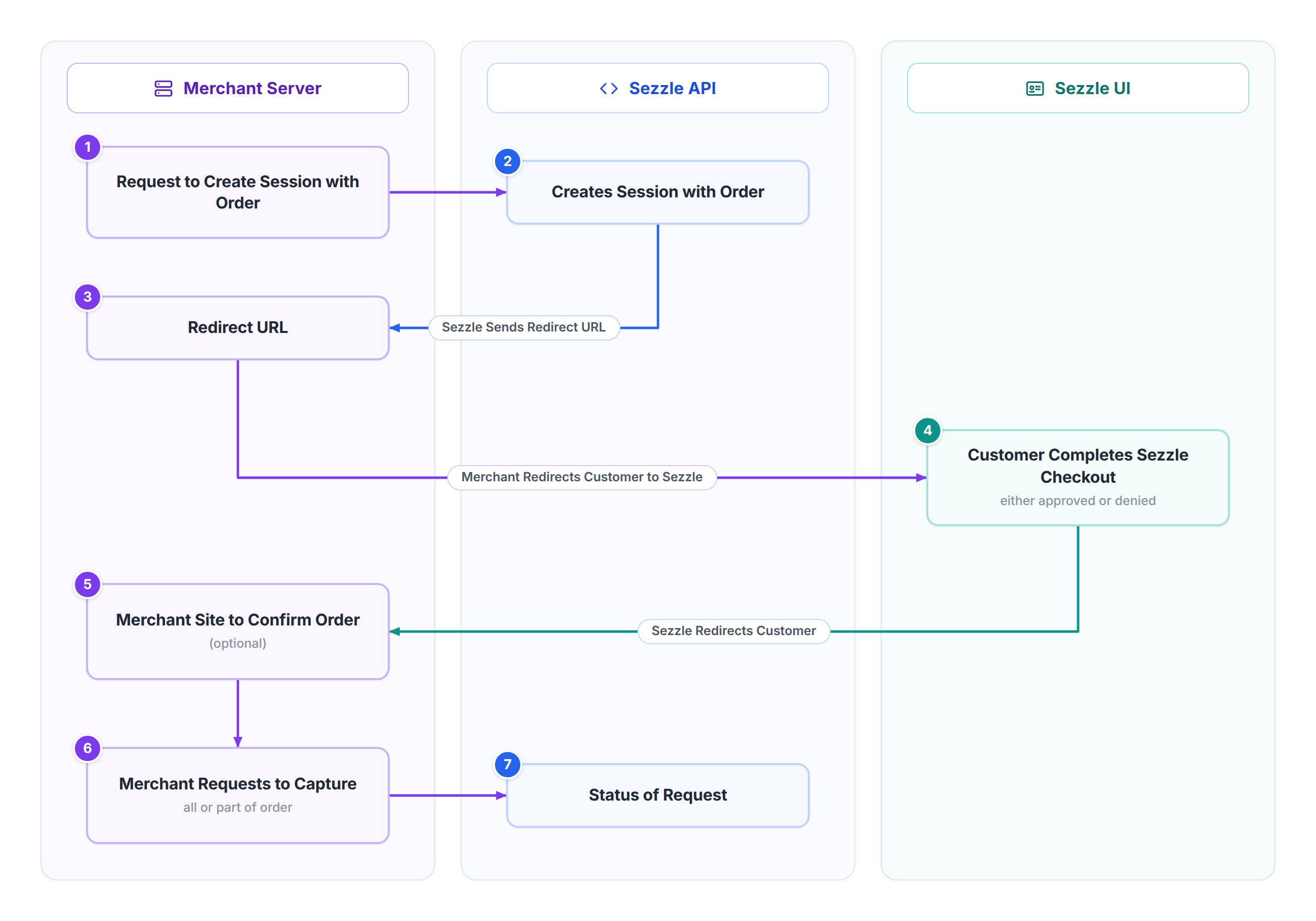
- Request Payment Session Creation
- The Merchant Server sends a request to the Sezzle API to create a payment session for the customer’s order, including details like the order amount, items, and customer information.
- Generate Session and Redirect URL
- The Sezzle API processes the request, creates a session linked to the order, and generates a redirect URL for the customer to access the Sezzle UI for payment processing.
- Receive Redirect URL from Sezzle API
- The Sezzle API sends the generated redirect URL to the Merchant Server, allowing the merchant to proceed with customer redirection.
- Redirect Customer to Sezzle UI
- Using the redirect URL, the Merchant Server directs the customer to the Sezzle UI to complete the payment process.
- Process Customer Checkout in Sezzle UI
- The customer reviews the order in the Sezzle UI and completes the checkout.
- Sezzle assesses the customer’s financing eligibility (e.g., via a credit check), approving or denying the transaction.
- If denied, the customer must use an alternative payment method.
- Redirect Customer Back to Merchant Site (Optional)
- After checkout (approved or denied), Sezzle redirects the customer to the Merchant Site.
- The merchant may display a confirmation page showing the order status (e.g., “Order Confirmed” or “Payment Failed”).
- This step is optional based on the merchant’s preference.
- Request Fund Capture
- Upon payment approval, the Merchant Server sends a request to the Sezzle API to capture the order funds, either in full or partially (e.g., for partial shipments).
- Receive Transaction Status from Sezzle API
- The Sezzle API processes the capture request and returns the transaction status to the Merchant Server.
- The status indicates whether the funds were captured successfully or if issues occurred (e.g., invalid amount and/or currency etc.).
- The merchant updates their system and notifies the customer accordingly.